

Targeting lets you control which customers see each survey question. Customer targeting is available for Checkout, App Block, and Popup surveys. Product targeting is available for Checkout surveys.
Customer Targeting
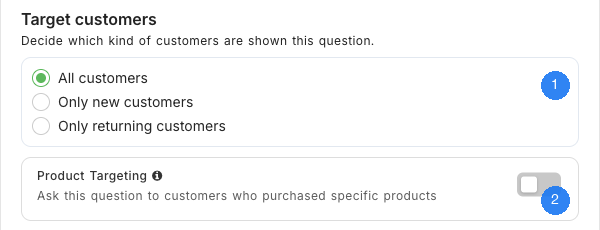
Customer targeting uses the order count UserLoop has recorded for an identified customer:
- All customers (default) — Every customer sees the question.
- Only new customers — Customers with zero or one tracked order see the question.
- Only returning customers — Customers with more than one tracked order see the question.
For example, you might ask new customers “How did you hear about us?” while asking returning customers “What brought you back?”.
Customer-type targeting requires an email address so UserLoop can look up the customer's tracked orders. For App Block and Popup surveys, place an Email question before questions restricted to new or returning customers. Customer-restricted questions are skipped when the visitor remains anonymous.
How Far Back Does Order History Go?
UserLoop starts tracking your store's orders when you install the app. Orders placed before installation are not included by default, so new-versus-returning targeting is based on the orders UserLoop has tracked from the installation date onwards.
This means someone who purchased before you installed UserLoop may still be treated as a new customer on their first tracked order after installation. Once UserLoop has recorded more than one order for that customer, they can be identified as returning.
If you would like to import all previous order history for more complete returning-customer coverage from day one, contact support. We can arrange a one-off historical order backfill. Because these imports can involve large amounts of order data, backfills are available on request.
Product Targeting (Checkout Surveys)
When enabled, the question is only shown when the current order includes one of the products you select. This lets you collect feedback about specific items—for example, a question shown only to customers who bought a newly launched product.
Combining Targeting Options
On Checkout surveys, you can combine Customer Targeting and Product Targeting. For example, show a question only to returning customers who purchased a specific product.
Troubleshooting Returning-Customer Targeting
- If a known repeat buyer is treated as new, check whether their earlier purchases pre-date the UserLoop installation.
- For App Block and Popup surveys, make sure an Email question appears before the targeted question.
- To include pre-installation purchases, reach out to support and request a one-off historical order backfill.
Need Help?
If you have questions about targeting or would like to request an order-history backfill, reach out to us via live chat and we'll be happy to help.